As plan administrator, you are responsible for administering the plan according to the plan documents and in compliance with the IRS.
Your responsibilities as plan administrator include:
Keeping records of all plan activities
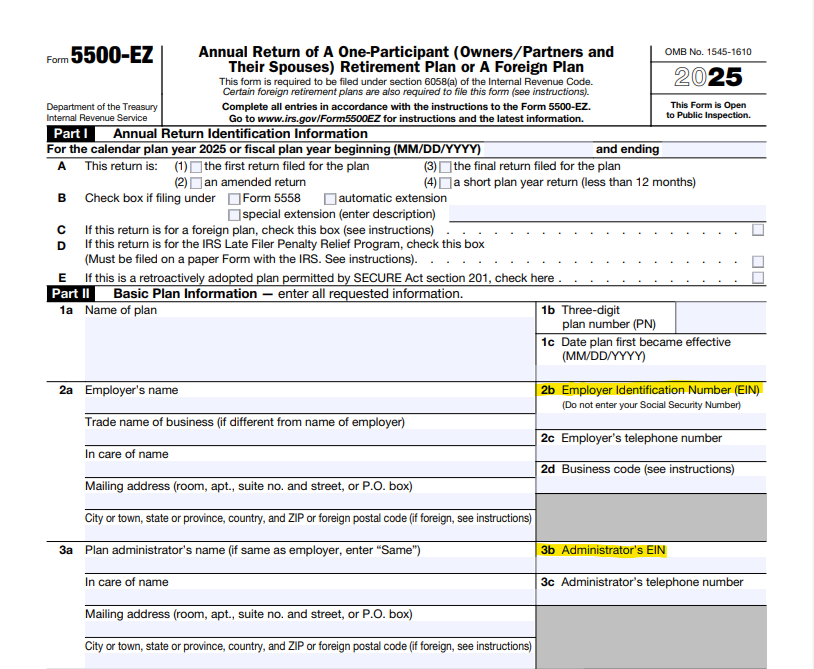
Filing on behalf of the plan as needed, including 1099-Rs and 5500-EZs
Ensuring participant loans, if any, are being paid back in a timely manner
Keeping records of all plan activities
Recordkeeping is one of the main responsibilities of the plan administrator. You will need records of all contributions, distributions, investments, etc.
The Miscellaneous Forms section contains forms that you can complete and keep in your files as plan administrator:
Separate accounts are required by your plan. They must be established for each participant and per type(s) of funds within the plan. They are also helpful for tracking the balances of each type of fund within your 401k.
Filings on behalf of the plan as needed, including 1099-Rs and 5500-EZs
You are also responsible for all filings on behalf of the plan. Depending on the activities and value of your plan, you may be required to file a 1099-R and/or a 5500-EZ:
Ensuring participant loans, if any, are being paid back in a timely manner
If a participant loan is taken from your Solo 401k, you also become loan administrator. You must ensure that all participant loans are being repaid in a timely manner, according to the repayment schedule established at the time of the loan.
You may be able to obtain a possible extension for filing Form 5500-EZ, but extensions must be obtained before the filing due date. If an extension is obtained, you would mark the appropriate box on Form 5500-EZ, Part I, B.
The due date of Form 5500-EZ filing is:
The last day of the 7th calendar month after the plan year end
This is July 31st, if the plan year end is December 31st
Possible extensions to file Form 5500-EZ include:
Form 5558
You can file for a one-time extension of the Form 5500-EZ deadline by filing Form 5558.
To be granted an extension:
Form 5558 must be filed by the Form 5500-EZ deadline
Form 5558 is for a one-time extension
The extension is up to the 15th day of the 3rd month after the normal Form 5500-EZ filing deadline
Form 5558 instructions and information can be found on the IRS website:
You may also be granted an extension of the Form 5500-EZ deadline if your adopting business has been granted an extension of its federal income tax return, to a date later than the normal Form 5500-EZ deadline.
This extension is automatically granted if all of the following conditions are met:
Your Solo 401k plan year and your adopting business’s tax year are the same, and
Your adopting business has been granted an extension of its federal income tax return, to a date later than the normal Form 5500-EZ deadline, and
A copy of the application for the extension of its federal income tax return is retained with your Solo 401k plan records
To utilize this extension, check “Automatic extension" in Part I, B of Form 5500-EZ.
Other special extensions announced by the IRS
According to the IRS:
The IRS may announce special extensions of time under certain circumstances, such as extensions for Presidentially-declared disasters or for service in, or in support of, the Armed Forces of the United States in a combat zone. If you are relying on one of these announced special extensions, check the “special extension” box on the Form 5500-EZ, Part I, line B, and enter a description of the announced authority for the extension.
Distributing funds out of the Solo 401k is called an “in-service distribution” when the Solo 401k plan and its adopting business are still active. The distributed funds can be rolled over into another retirement account.
Most clients do not want to roll funds out of the Solo 401k because of its checkbook control and ability to invest in a wide range of investments. However, there may be certain cases when a client wishes to roll funds out of the Solo 401k.
The ability to take an in-service distribution from the Solo 401k is based on:
Performing the rollover out of your Solo 401k, if eligible
You will be the one distributing the assets from your Solo 401k
Since you have checkbook control over your Solo 401k, you will need to move the funds on behalf of your Solo 401k. For example, to roll your Solo 401k into an IRA, you would write a check from the Solo 401k bank account to the IRA.
You are responsible for filing Form 1099-R for any rollovers out of your Solo 401k
Form 1099-R is required for non-taxable rollovers. This form must be distributed from your Solo 401k to you in January of the year following the distribution or rollover.
Can I have part-time or full-time employees in my business, if I have a Solo 401k? What if I want to hire employees in the future?
Your Solo 401k is an owner-only plan.
It is designed for the owner of a business who does not have full-time or certain part-time employees, other than the owner and potentially, the spouse.
You are not eligible for the Solo 401k if you/your spouse:
Own business(es) that have full-time employee(s), other than yourselves
Own business(es) that have part-time employee(s), other than yourselves, who work:
At least 500 hours per year, and
For 2 consecutive years
The above criteria does not apply to independent contractors (1099s), if paid by the business. Independent contractors are not considered employees of the business.
If you have any part-time employee(s), please do the following:
Check their hours
Any part-time employee(s) who have worked at least 500 hours for 2 consecutive years become eligible for the plan. And this causes you to become ineligible for the Solo 401k, because the plan is meant for owners only.
If your part-time employee(s) have worked and will remain under 500 hours
You remain eligible for your Solo 401k
Make sure, however, that your plan documents contain the service requirement described below
Check your plan documents
If you have any part-time employee(s), you should have a service requirement checked in your plan documents
Review your Post PPA Defined Contribution Adoption Agreement, page 5
C4.b should be checked as below:
Contact Sense Financial to update the plan if the above service requirement is not marked in your plan documents
Notify Sense Financial Services to update or terminate the plan, if needed
If your part-time employee(s) have worked at least 500 hours for 2 consecutive years, you will need to terminate your plan
Notify Sense Financial to do so immediately
Freezing the plan may be a possible temporary option, before terminating the plan. It allows you to maintain your investments and continue to manage it as the trustee, without the ability to contribute to the plan. It is meant to be a temporary measure only.
Did you know that you are the fiduciary of your Solo 401k?
In addition to being a participant in the plan, administering the plan as plan administrator, directing the plan as trustee, you are also the fiduciary.
This means that you are responsible for doing the following, as noted by the US Department of Labor (DOL):
Acting solely in the interest of the participants and their beneficiaries;
Acting for the exclusive purpose of providing benefits to workers participating in the plan and their beneficiaries;
Paying only reasonable plan expenses;
Carrying out duties with the care, skill, prudence, and diligence of a prudent person familiar with such matters;
Following the plan documents; and
Diversifying plan investments
With the benefits of your Solo 401k comes responsibilities. To equip yourself for your fiduciary responsibilities, do the following:
Read your plan documents
Review the set of plan documents that was sent to you by Sense Financial.
The Defined Contribution Adoption Agreement is the central document of your set. Take a few minutes to read through it.
The Summary Plan Description takes the selections from the Defined Contribution Adoption Agreement and spells them out in plain language, in a question and answer format.
Read and watch the resources on the client portal
The client portal is your go-to resource, available at all times.
The Knowledge Base is a great section to read, look up topics via search, and learn. Our videos are also available in the Education section of the client portal.
Make sure you are subscribed to Sense Financial's emails
Most importantly, our compliance emails. We regularly send out announcements, reminders, and updates related to keeping your plan in compliance.
List quoted from the US Department of Labor (DOL) resource below:
The mega backdoor Roth strategy is a way to get more Roth funds into your retirement account. Roth funds are taxed initially but grow tax-free.
The mega backdoor Roth strategy consists of:
Making after-tax contributions to the Solo 401k, and
Converting those after-tax contributions to Roth within the Solo 401k, and
Keeping those Roth funds in the Solo 401k for checkbook-control investing or rolling over the funds into a Roth IRA
The Mega Backdoor Roth strategy offers an alternative to contributing to a Roth IRA directly, which is limited to $7,000 per year by the IRS. Many individuals also do not qualify for a Roth IRA due to their high earnings.
Your Solo 401k with Sense Financial already includes the features which allow you to utilize the mega backdoor Roth strategy.
How it works
Open separate accounts for your Solo 401k to house your after-tax contributions and Roth funds, if you do not have these already
From a banking standpoint, these separate accounts will be identical. Both are in the name of your 401k and using the EIN of your 401k. However, these accounts are established to keep the funds separate from each other and to assist you in your accounting of each type of fund within your 401k. You can assign nicknames to the separate accounts online in order to differentiate them.
Calculate the after-tax contribution based on your self-employment business earnings
Make the after-tax contribution into the 401k account for after-tax contributions
Once that after-tax contribution is in your 401k, immediately convert the funds to Roth and move those funds to the Roth account
Note that the growth on the after-tax contribution is taxable, so you will want to convert the after-tax contribution to Roth immediately after the contribution is made.
Keep those funds within the Roth account of your Solo 401k for checkbook-control investing or roll those funds over to a Roth IRA
The following year, file a 1099-R to document the conversion
How it should be reflected on a 1099-R
In this case, the 1099-R should document the conversion of the after-tax contribution to Roth within your 401k. The Payer is your 401k trust, which is issuing the 1099-R to you, the Recipient.
Payer: your 401k trust
Payer TIN: the EIN of your 401k trust (not the EIN of your adopting business)
Recipient TIN: your SSN
Recipient: you, as an individual
Box 1: Gross distribution: amount that was converted to Roth
Box 2a: Taxable amount: 0.00 if the after-tax funds were converted to Roth immediately. The taxable amount would be 0.00 since the after-tax contribution was not originally claimed as a deduction and was converted to Roth immediately. If the after-tax contribution was not converted to Roth immediately, the growth amount is taxable and should be entered here.
Box 5: Employee contributions/Designated Roth contributions or insurance premiums: amount of the original after-tax contribution. If you converted the after-tax contribution to Roth immediately after making the contribution, this should be the same amount as in Box 1
Box 7: Distribution code: G which indicates a direct rollover (from after-tax to Roth) within the plan, your 401k
When the 1099-R should be filed
The 1099-R is filed in the year following the year in which the Roth conversion was performed (e.g. the 1099-R for 2022 is filed in 2023). There are two deadlines for the 1099-R:
The Payee/recipient copy must be received by January 31st
The electronic copy must be filed with the IRS by March 31st
You are responsible for the filing of the 1099-R by both deadlines.
The IRS has released Form 8915-E and 8915-F for the reporting of CARES Act distribution(s) that were taken in 2020, their repayment, or their inclusion in income.
If you took a CARES Act distribution in 2020, note which form(s) would apply to you:
Form 8915-E is used to report:
If you took a CARES Act distribution in 2020
Form 8915-F is used to report:
Your income in 2021 if you took a CARES Act distribution in 2020 and have been including in your income in equal amounts over 3 years and that 3-year period has not yet lapsed
Your repayments of a CARES Act distribution, if repaying the distribution
Note that repayment of the CARES Act distribution can be done over 3 years, starting with the day after the distribution was received. Repayment(s) can occur through multiple payments or one lump sum payment by the end of those 3 years. If the entire CARES Act distribution is paid back within that time, the distribution will not be taxed.
You will want to request your CPA’s assistance in completing the appropriate form for your situation.
More information on these two forms can also be found at:
I'm getting ready to file Form 5500-EZ and need help calculating the plan assets of my 401k. I used some of the funds for a down payment to purchase an investment property. The rest of the purchase price was financed using a hard money loan. My wife doesn't have any investments at this time, just some cash. How do I calculate the net plan assets?
To calculate the total plan assets of the 401k, add up all assets plus cash for all participants.
Form 5500-EZ is for the entire plan, i.e. for all participants, combined. If the total plan assets exceed $250,000, you are required to file Form 5500-EZ.